




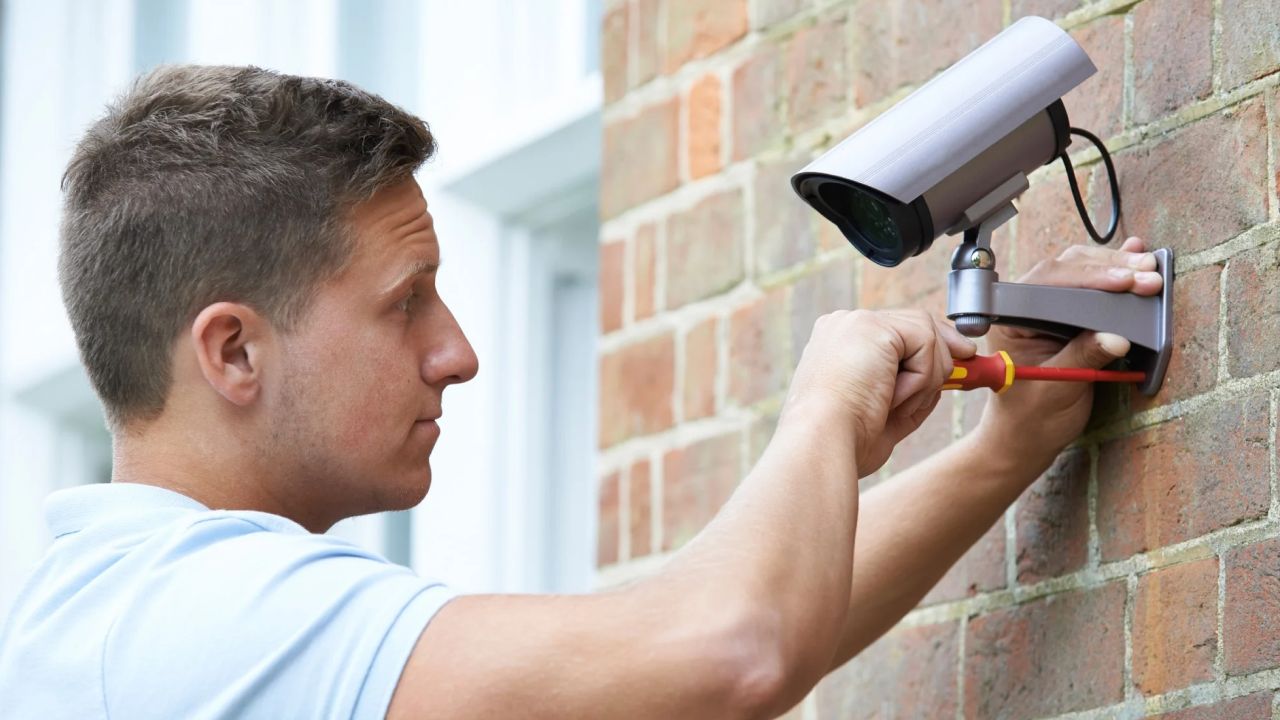
Maximizing Home Security: Where to Place Your Cameras for Optimal Protection
A robust security system is essential for every home, providing peace of mind through personal protection and defense against various threats to property. Security systems act as an additional layer of vigilance, safeguarding your clients whether they are at home, out for a few hours, or away for extended periods.
However, the effectiveness of a security system hinges significantly on the strategic placement of cameras. Consider the unfortunate scenario of a break-in, fire, or other emergency—if cameras are not positioned correctly, they might only capture an empty wall. This comprehensive guide outlines optimal locations for installing security cameras, ensuring your clients receive the professional protection they deserve.
To enhance surveillance within a home, here are key locations for placing indoor cameras:
Hallways and Main Staircases
Installing cameras in hallways and near main staircases ensures that any movement within the home is recorded. If an intruder enters through a less monitored area, such as a bedroom or bathroom, they will likely be captured on camera as they traverse these central passages.
Common Areas
Positioning cameras in common areas—such as living rooms, kitchens, and dens—provides a comprehensive overview of household activity. These locations are often gathering spots, making it easier to monitor not just for burglaries but also for verifying the actions of service personnel or keeping an eye on children and pets.
Second Floor
For clients with valuable items stored on the second floor, placing cameras in the hallways can provide added security. This coverage helps ensure that these important areas remain monitored.
Basements
Including the basement in the security plan is wise, especially if it houses valuables or has external access points. This area can be particularly vulnerable and should not be overlooked.
Detached Buildings and Garages
Security cameras are vital for detached structures and garages, which often contain valuable tools, recreational equipment, and vehicles. These locations are prime targets for thieves and may also pose hazards that could lead to emergencies.
Here are recommended locations for placing security cameras outside the home:
Front Door
Surprisingly, many burglars avoid entering through the front door, yet this area remains a hotspot for crimes such as package theft and solicitation fraud. A camera at the front door can help deter these activities.
Back and Side Doors
It’s essential to install cameras at back and side doors, as these entry points are often less visible from the street, making them appealing to intruders.
Driveway and Garage
Given that garages are common access points for burglars, positioning a camera at the garage entrance or directed at the driveway is advisable. This ensures coverage of anyone entering or attempting to access the property.
Windows
Ground floor windows are particularly vulnerable to break-ins. Cameras should be strategically placed to cover these entry points to maximize protection.
Yard
Cameras focused on the yard can help clients detect any suspicious activity, such as someone surveying the property for criminal intent. Additionally, these cameras can capture moments involving children and pets.
While installing security cameras is beneficial, certain locations are inappropriate and may infringe on privacy:
Bedrooms
Though it might seem prudent to monitor bedrooms for safety, it’s generally inadvisable due to the expectation of privacy in these spaces. Instead of cameras, a baby monitor may be a more suitable option for families with small children.
Bathrooms
Similar to bedrooms, bathrooms rarely need surveillance. The likelihood of an intrusion occurring in this space is minimal, rendering cameras unnecessary.
Neighbor’s Property
Camera placement laws vary by state, but homeowners are typically allowed to install outdoor cameras that monitor their property. However, directly pointing cameras at a neighbor’s property can raise privacy concerns and legal issues. It’s crucial to help clients navigate these regulations to avoid potential violations.
Articles
All articles
The Complete Guide to Retail Crowd Density Monitoring Using Video Analytics
The Complete Guide to Retail Crowd Density Monitoring Using Video Analytics
The Ultimate Guide to Occupancy Tracking Technology: Systems, Sensors, and Strategy
The Ultimate Guide to Occupancy Tracking Technology: Systems, Sensors, and Strategy
Maximizing Retail Performance: The Ultimate Guide to Heat Mapping Technology
Maximizing Retail Performance: The Ultimate Guide to Heat Mapping Technology
The Complete Guide to Deploying AI Video Analytics in Retail and Enterprise
The Complete Guide to Deploying AI Video Analytics in Retail and Enterprise

How to Design a Scalable Video Surveillance System for Multi-Site Retail
How to Design a Scalable Video Surveillance System for Multi-Site Retail
Upgrading Legacy CCTV: How to Integrate AI Without a Rip-and-Replace
Upgrading Legacy CCTV: How to Integrate AI Without a Rip-and-Replace
Upgrading Legacy CCTV: The Complete Guide to AI Security Camera Integration
Upgrading Legacy CCTV: The Complete Guide to AI Security Camera Integration
The Evolution of Video Analytics: How AI Transforms Security and Operations
The Evolution of Video Analytics: How AI Transforms Security and Operations
How AI Video Surveillance Solves Security Staffing Shortages and Reduces Costs
How AI Video Surveillance Solves Security Staffing Shortages and Reduces Costs
Maximizing Security System ROI: The Financial Case for Smart Surveillance
Maximizing Security System ROI: The Financial Case for Smart Surveillance

How to Calculate the ROI of a Business Security System
How to Calculate the ROI of a Business Security System
Master Multi-Brand CCTV Management: The Ultimate Guide to Brand-Agnostic Surveillance
Master Multi-Brand CCTV Management: The Ultimate Guide to Brand-Agnostic Surveillance

Strategic Guide to Retail Video Surveillance Migration: Upgrading Legacy Systems
Strategic Guide to Retail Video Surveillance Migration: Upgrading Legacy Systems

How to Reduce Commercial Security Costs Without Compromising Protection
How to Reduce Commercial Security Costs Without Compromising Protection
How to Reduce Retail Operational Costs With Video Analytics
How to Reduce Retail Operational Costs With Video Analytics
Security Staffing Optimization: The Complete 2026 Guide
Security Staffing Optimization: The Complete 2026 Guide
AI Retail Theft Prevention: How Smart Cameras Stop Shrinkage
AI Retail Theft Prevention: How Smart Cameras Stop Shrinkage

Modern Shopping Center Security Systems: The Complete Guide
Modern Shopping Center Security Systems: The Complete Guide
Video Management Systems Explained: Features, Benefits, and How to Choose the Right VMS
Video Management Systems Explained: Features, Benefits, and How to Choose the Right VMS

The Reality of the Single Pane of Glass: Achieving Unified IT Visibility
The Reality of the Single Pane of Glass: Achieving Unified IT Visibility
Try TRASSIR For Your Business
Learn more about how TRASSIR analytic modules work! Demo mode is an opportunity to see for yourself how the system works, and also check the interface and test all the functions.Success!
We will contact you as soon as possible